Basecamp to-dos can't show priority or status. Fix that.

Add tags, statuses, and custom fields to any Basecamp to-do, then see it all as a Kanban board. One Chrome extension, inside Basecamp, with nothing new for your team to learn.

Free 7-day trial · No credit card · Works with Basecamp 5

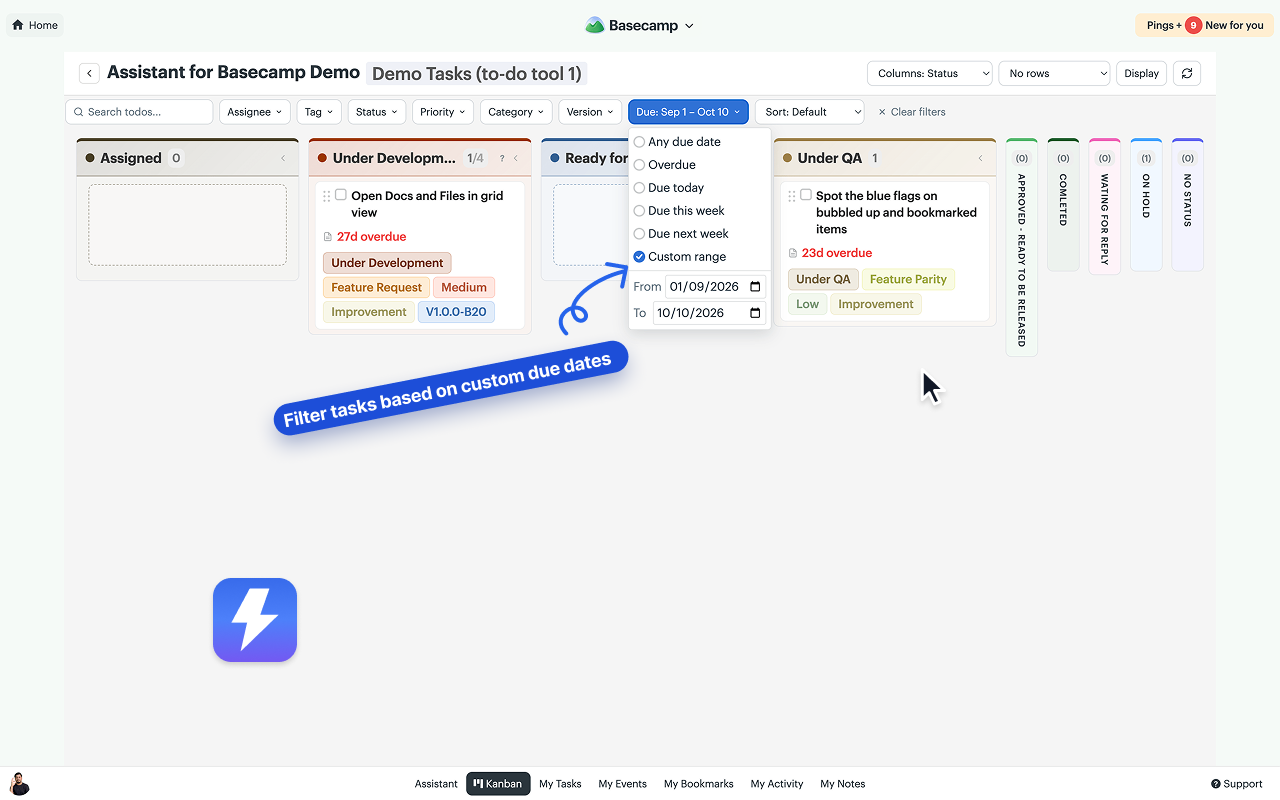
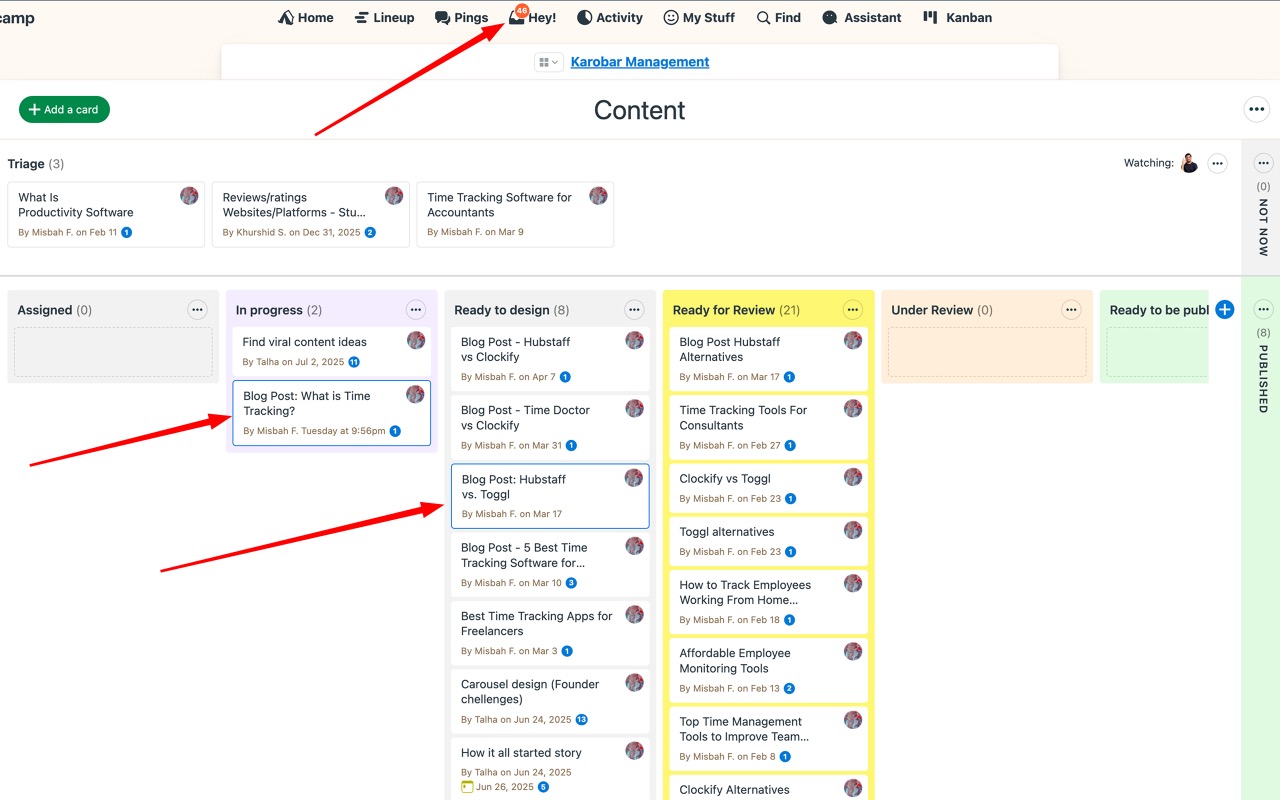
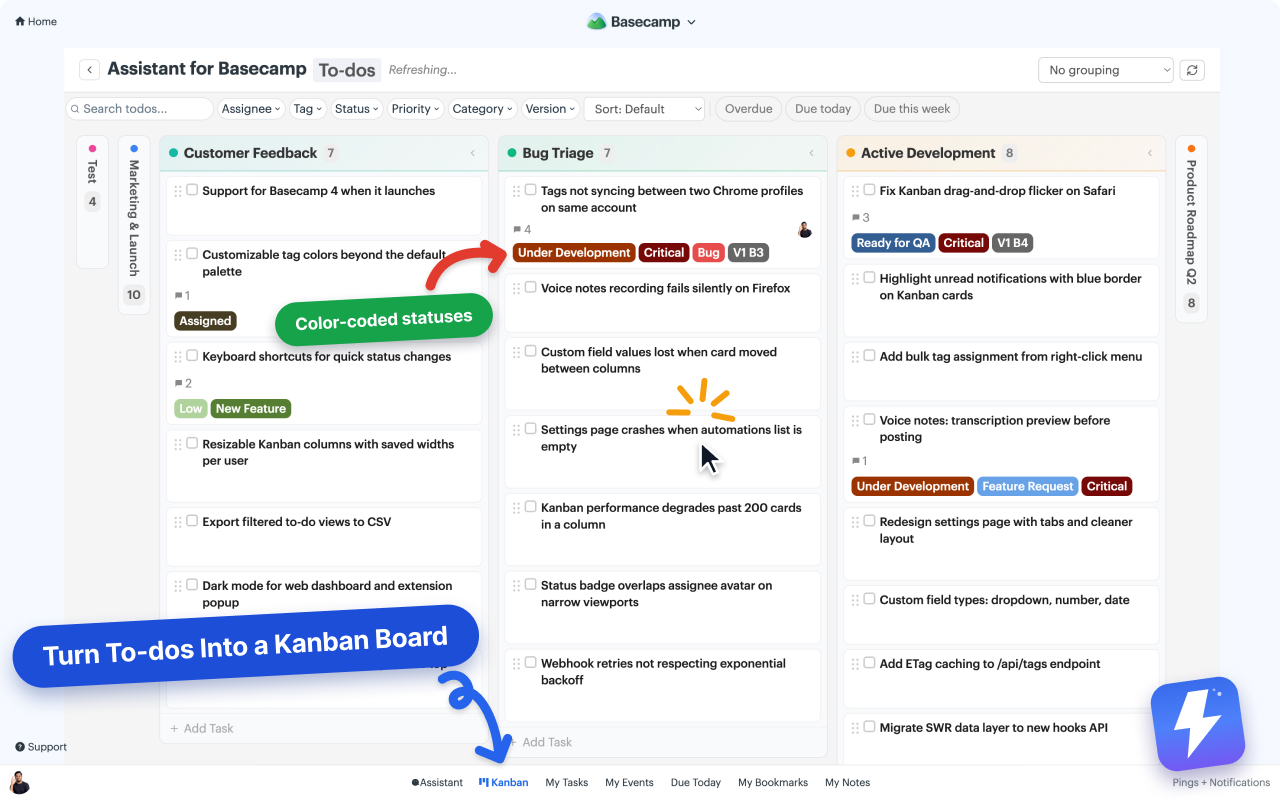
Assistant's Kanban board running inside Basecamp, with color-coded statuses and tags on every card
The real thing, running on a live Basecamp project.
Your team stays in Basecamp Set up in 2 minutes One price, unlimited team

The problem

Basecamp is calm and simple. Sometimes too simple.

A to-do is just a name and a checkbox. No priority, no status, no way to see what's urgent at a glance, and no board to watch work move through. So the real status ends up in your head, in side spreadsheets, or in your inbox.

Everything looks the same

You can't tell what's urgent, what's blocked, or what's nearly done. Every to-do is just another line.

No board, just lists

Work lives in long, flat to-do lists. There's no Kanban view to see what's moving through the pipeline.

Status lives everywhere else

In your head, a spreadsheet, or a "what's the update?" email. Never on the to-do itself, where you need it.

Voice note transcription

Turn voice notes into text everyone can read.

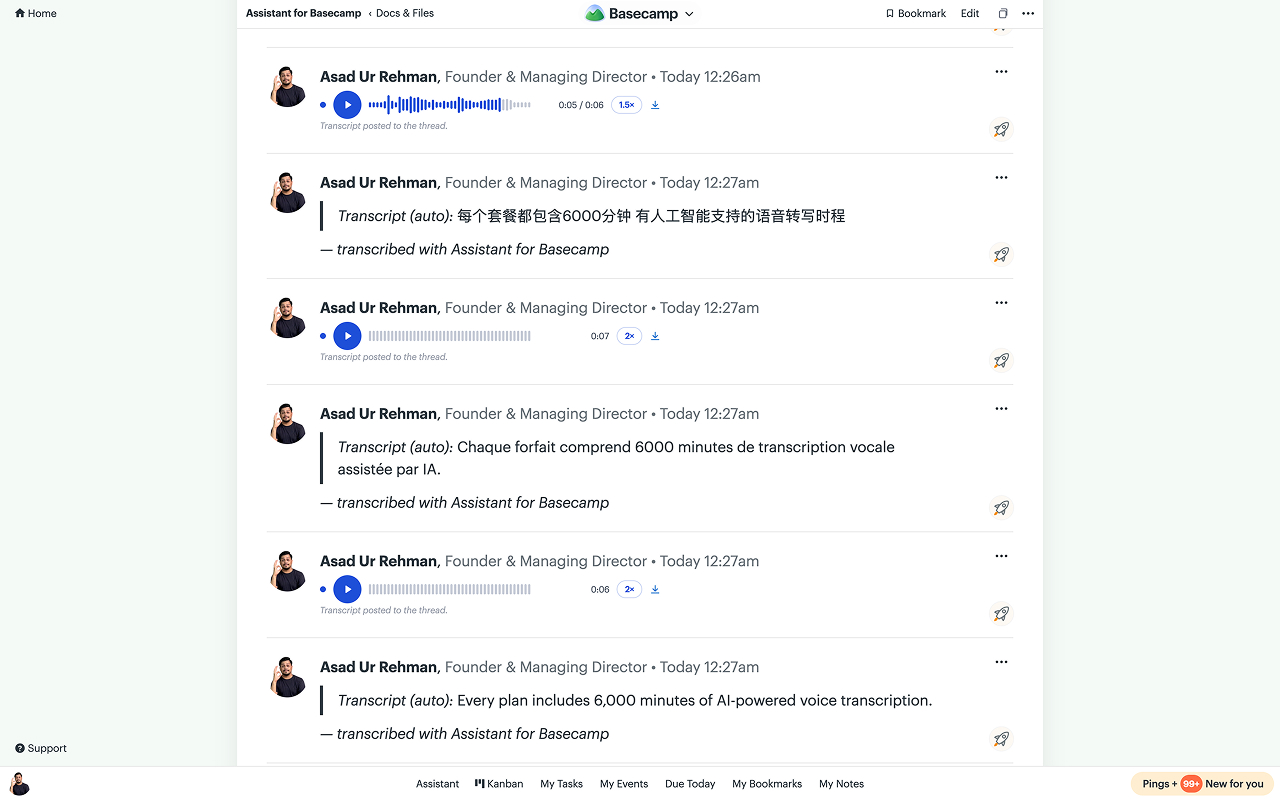
Basecamp 5 records voice notes but never transcribes them, so a two-minute note takes two minutes to hear, can't be skimmed, and is invisible to search. Assistant adds a Transcribe button under every note.

  • One click, on your notes or anyone else's
  • Posted as a comment, so people without Assistant read it too
  • A summary and action items on longer notes
  • 6,000 transcription minutes a month, included

Everything about voice transcription →

A Basecamp thread where each voice note shows Assistant's waveform player and, below it, the auto-transcript posted as a comment signed "transcribed with Assistant for Basecamp"

Tags, statuses & custom fields

Give every to-do the fields it's missing.

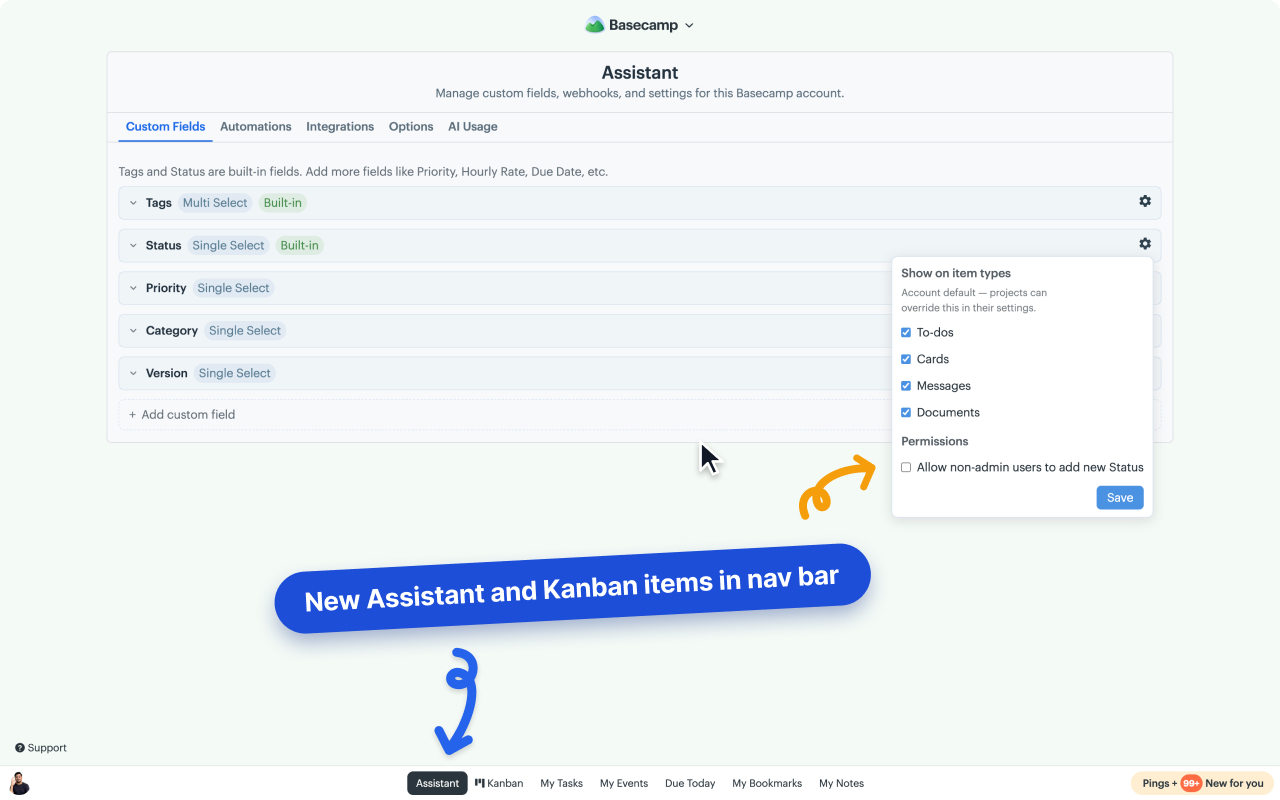
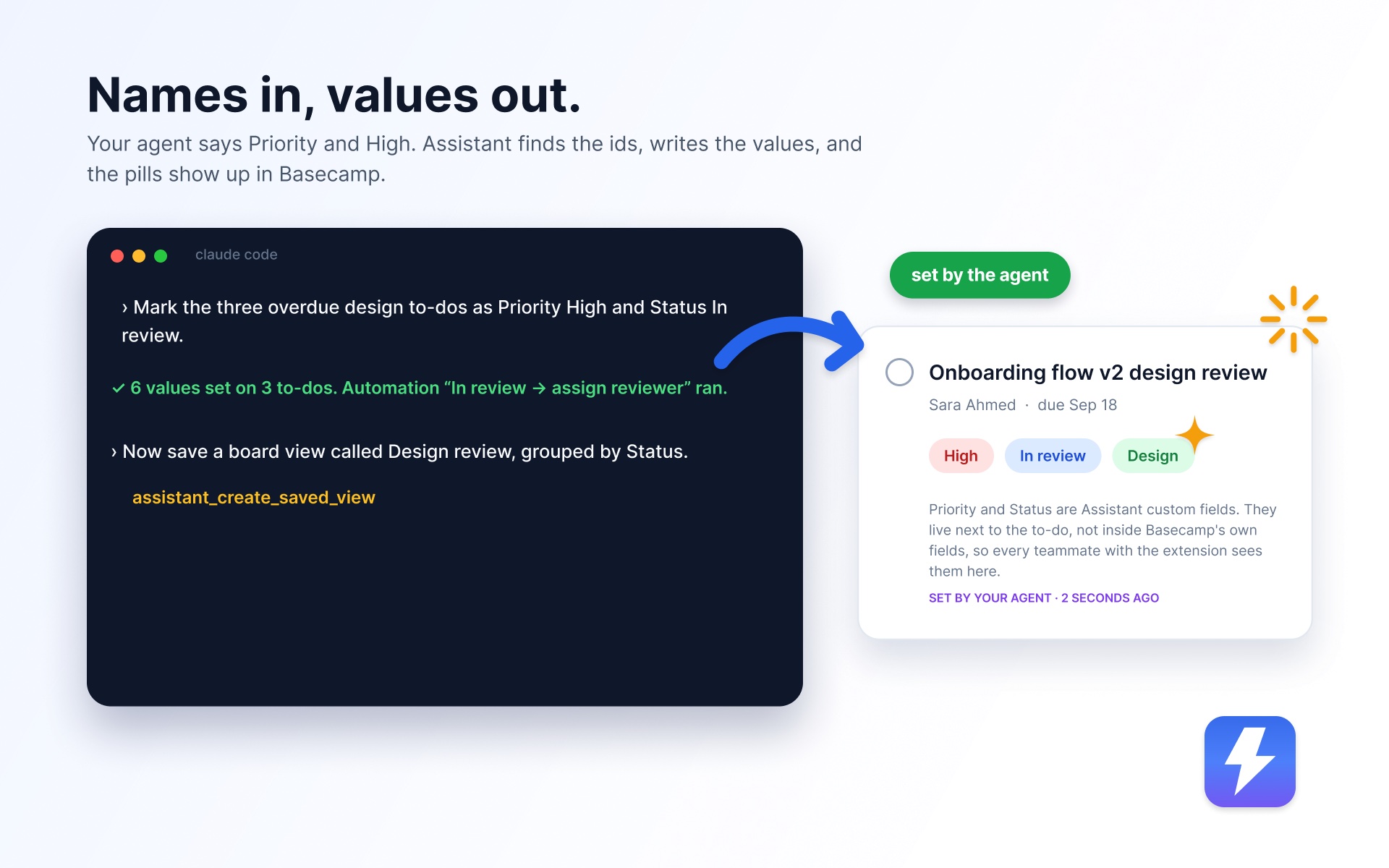
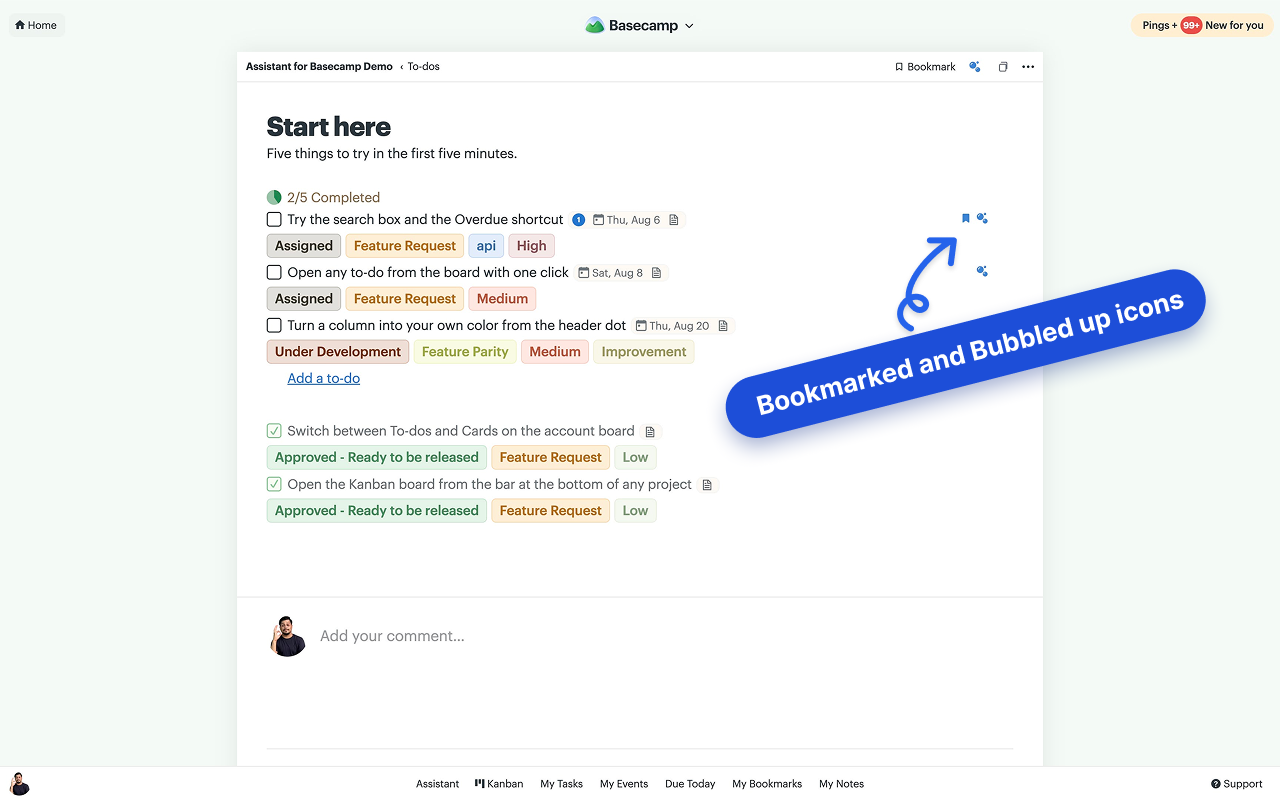
Tags and Status come built in. Add Priority, Estimate, Version, Category, or any other field you need, each with its own color-coded options. Now one glance tells you what matters.

  • Color-coded tags & statuses, ready to use
  • Add any custom field: priority, estimate, version, category
  • Shows up right on the to-do, inside Basecamp

Everything about custom fields →

Assistant's Custom Fields tab for a Basecamp account, with a field's settings popover open: Show on item types checkboxes and the permission controlling who may add new options
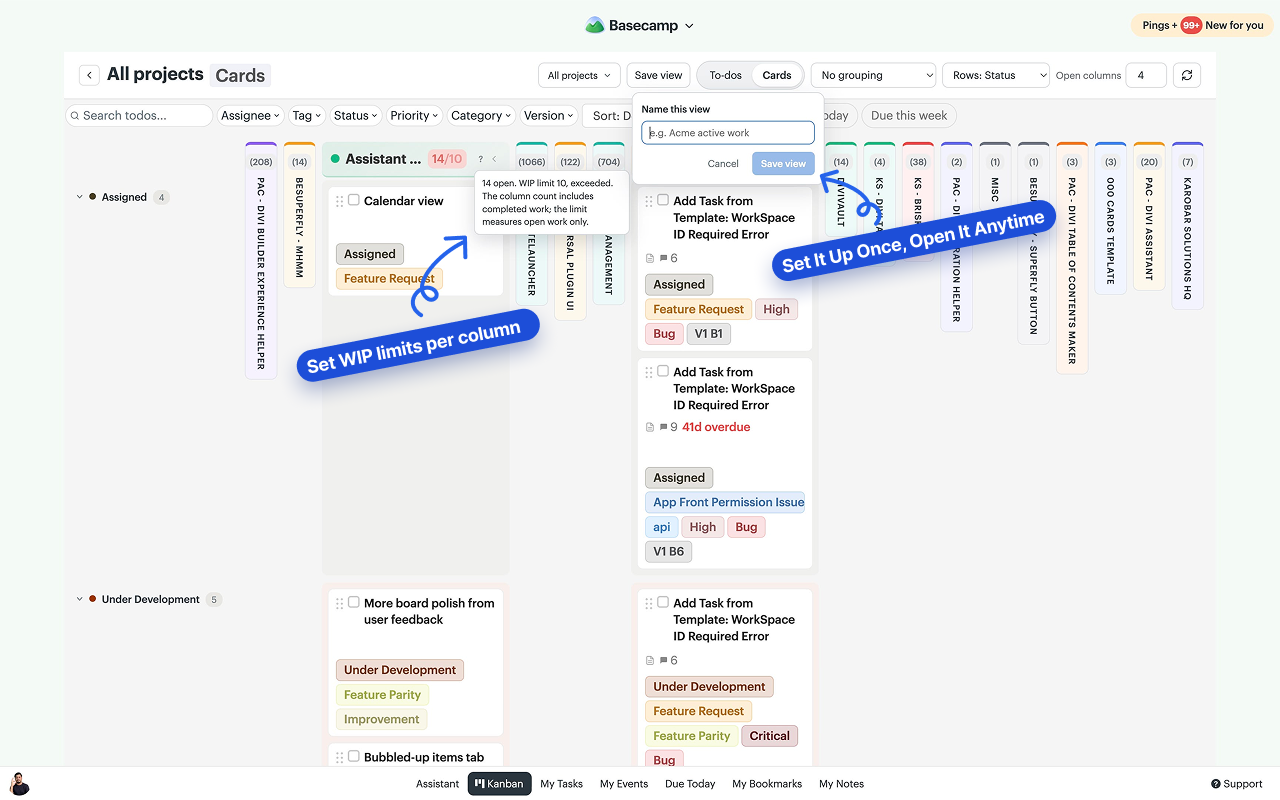
Assistant's All projects board inside Basecamp, with the picker open to search projects and clients and choose which ones the board covers

Kanban board

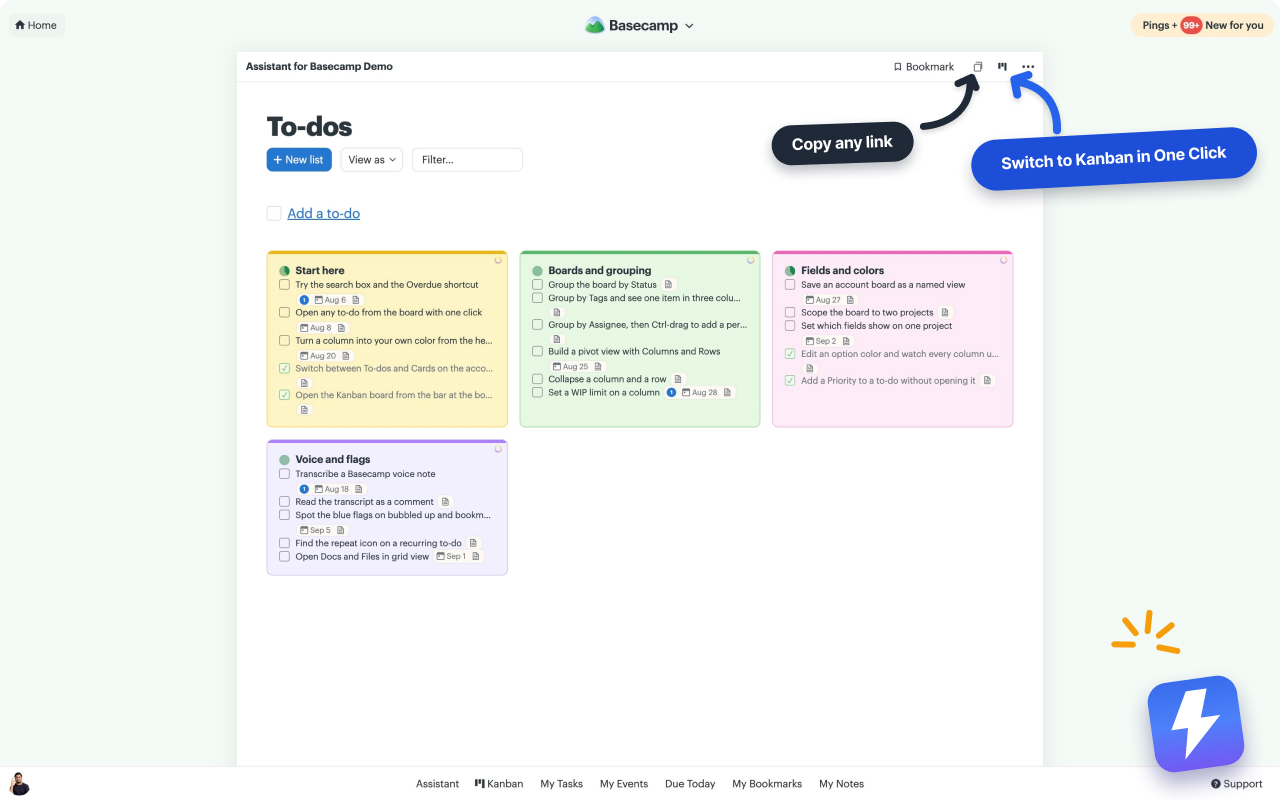
Turn your to-do lists into a board.

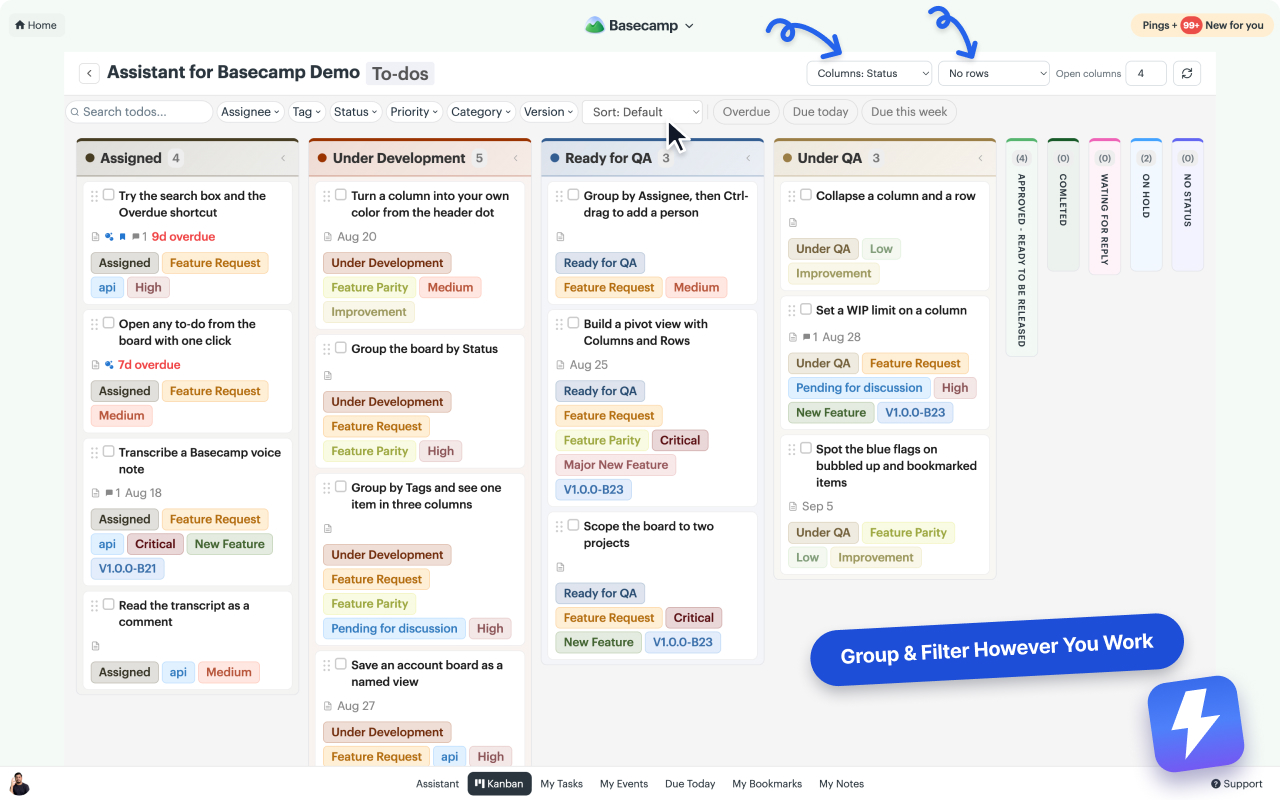
Every to-do list becomes a column automatically. Open one list, a whole project, or every project in your account on a single board, then drag cards across and group and filter by status, assignee, tag, or priority.

  • Drag-and-drop board on any Basecamp project
  • One board for a single list, a project, or every project at once
  • Group by status, assignee, tag, or priority
  • Pivot view: one field across the top, another down the side

Everything about the Kanban board →

Automations

Stop doing the busywork by hand.

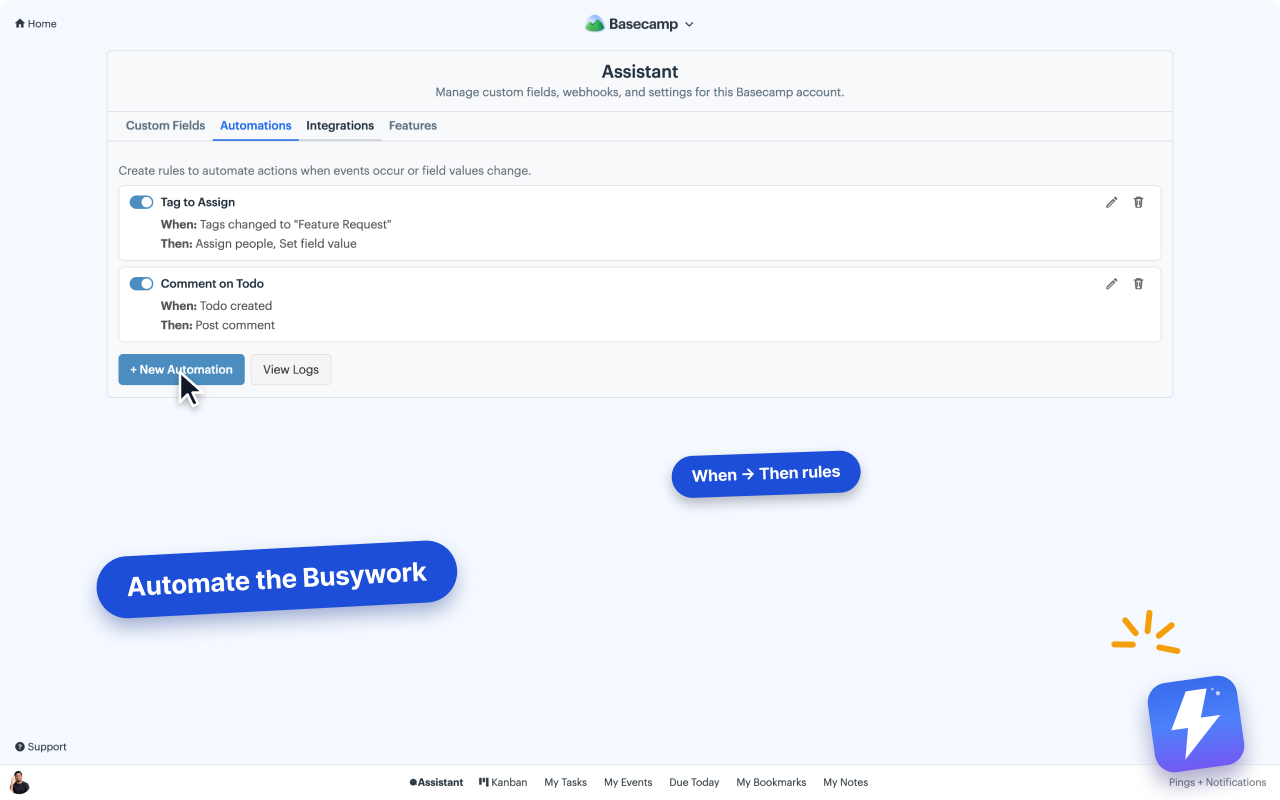
Set rules that tag, assign, and set fields for you. A new to-do tagged "Feature Request" can auto-assign the right person and set its priority the moment it's created, without anyone touching it.

  • When/then rules on tags, statuses, and fields
  • Auto-assign people and set values
  • Runs quietly in the background
Assistant's automation builder inside Basecamp, showing when/then rules like Tag-to-Assign
Assistant highlighting cards and items that changed since your last visit inside Basecamp

Unread highlight

See what changed since you were last in.

Jump back into a project and the new and updated items are highlighted for you, so you're not scrolling back through everything to spot what moved while you were gone.

Docs & Files grid

The grid view Basecamp 4 users miss.

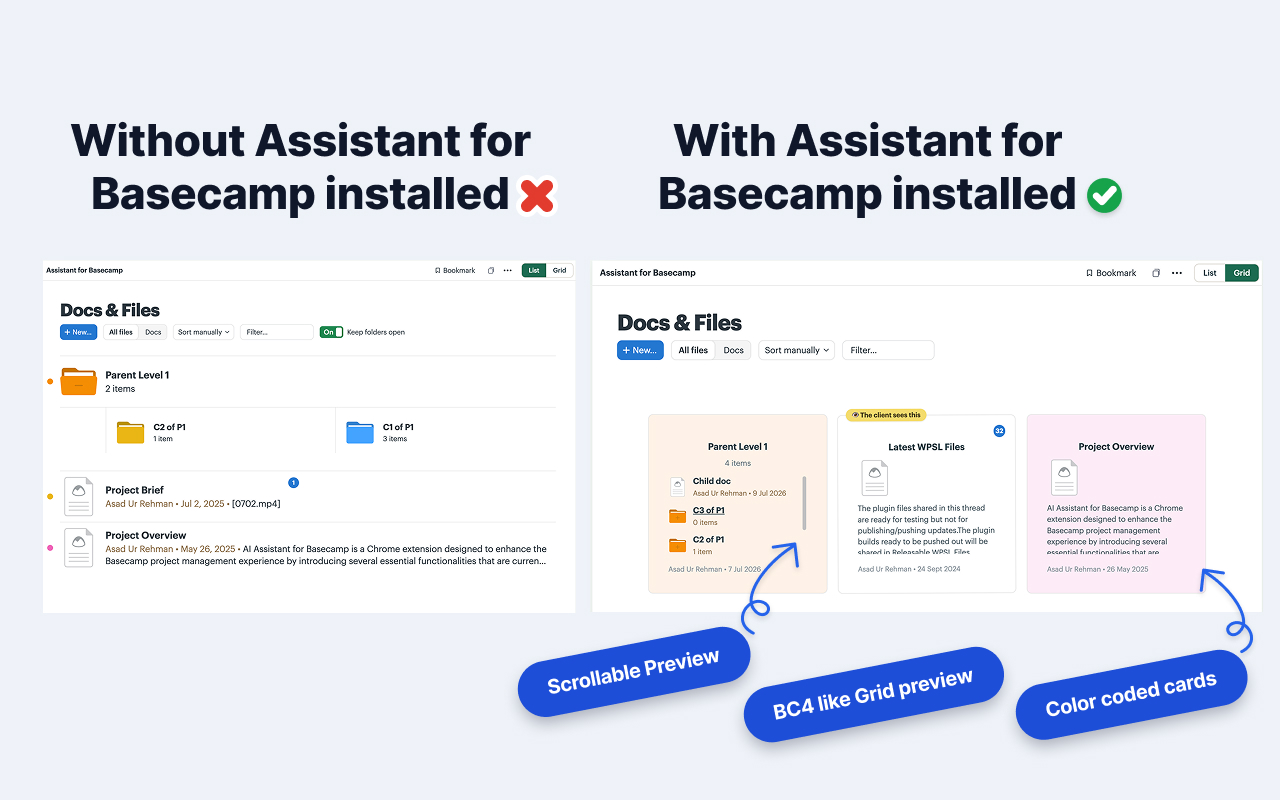
Flip any Docs & Files page from list to grid: folder cards you can peek into and scroll, image thumbnails, and Basecamp color labels you can set right from the card. Drag to file items into folders, or back out of them.

  • Folder cards with scrollable previews
  • Your custom-field pills on every card
  • Drag to reorder or file items in and out of folders, with live drop hints
Before and after: Basecamp's Docs & Files as a plain list without Assistant, and as a card grid with scrollable folder previews and color-coded cards with it
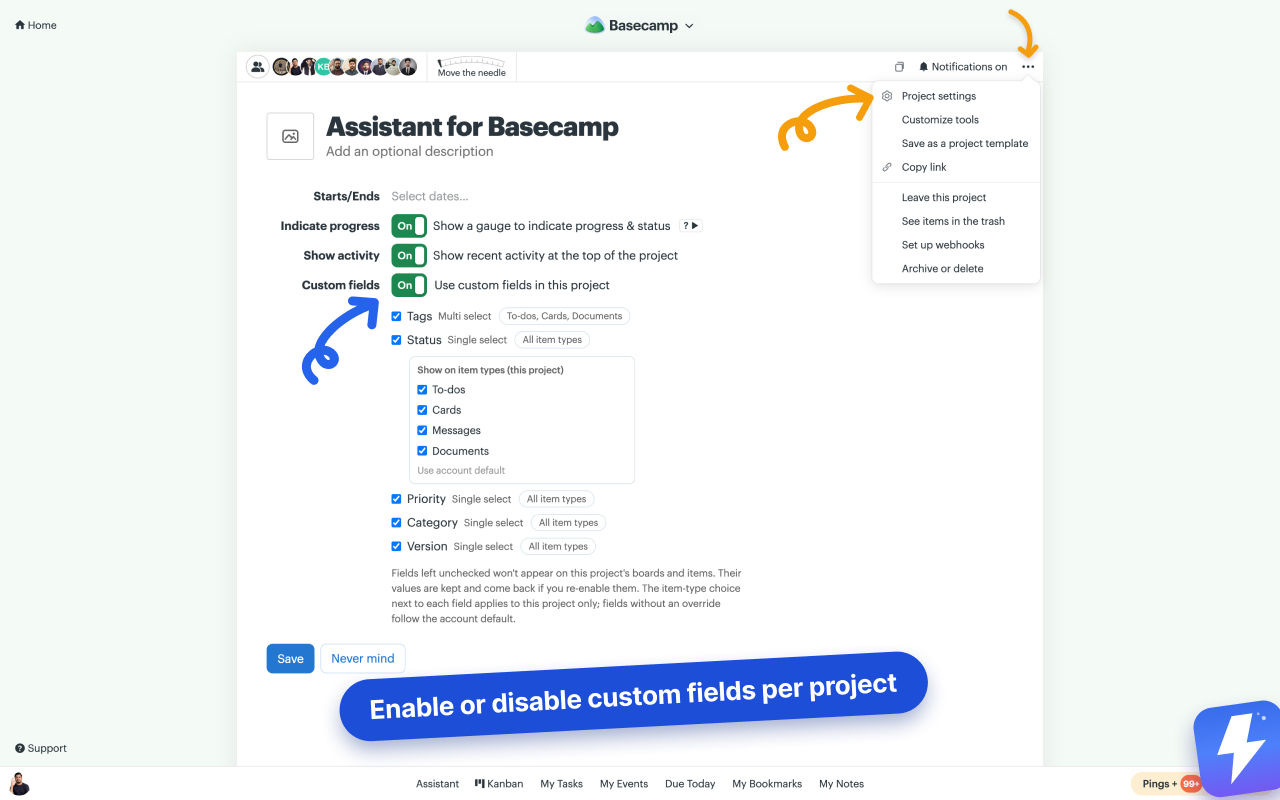
Basecamp's project settings page with Assistant's Custom fields row: a toggle and per-field checkboxes to choose which custom fields the project uses

Per-project custom fields

Every project gets exactly the fields it needs.

Turn custom fields on or off per project, straight from Basecamp's project settings. A client project stays lean while your dev board runs Priority, Category, and Version.

  • One toggle in the project's own settings
  • Uncheck fields you don't need there. Values are kept
  • New fields stay visible everywhere by default

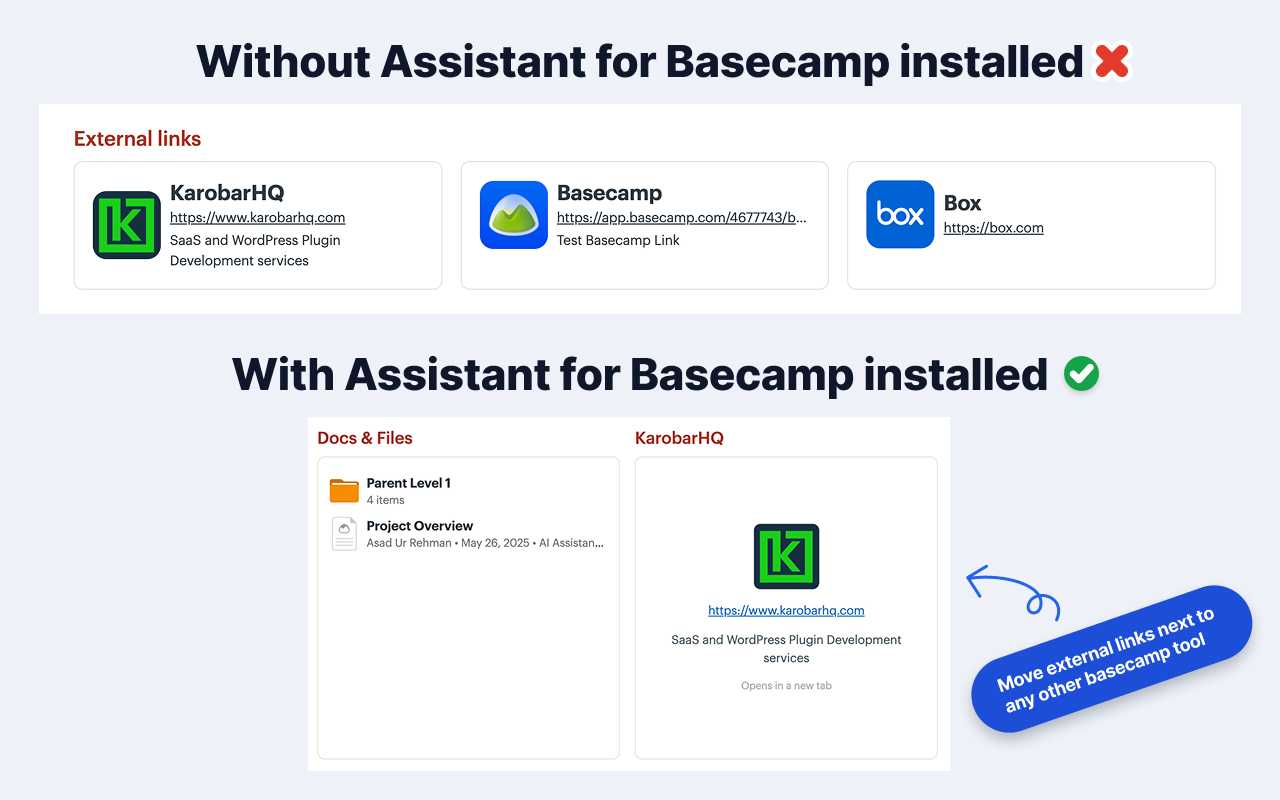
External links as dock cards

Give external links a real place on the project.

Basecamp squeezes a project's external links into a small flat strip. Assistant turns each one into a full dock card you can position next to any other tool, right where your team expects it.

  • Full-size cards on the project home
  • Move them next to Docs & Files, the Message Board, anywhere
Basecamp's flat external-links strip without Assistant, and the same links as full dock cards next to the other project tools with it

Card table duplication

Duplicate a whole card table in one click.

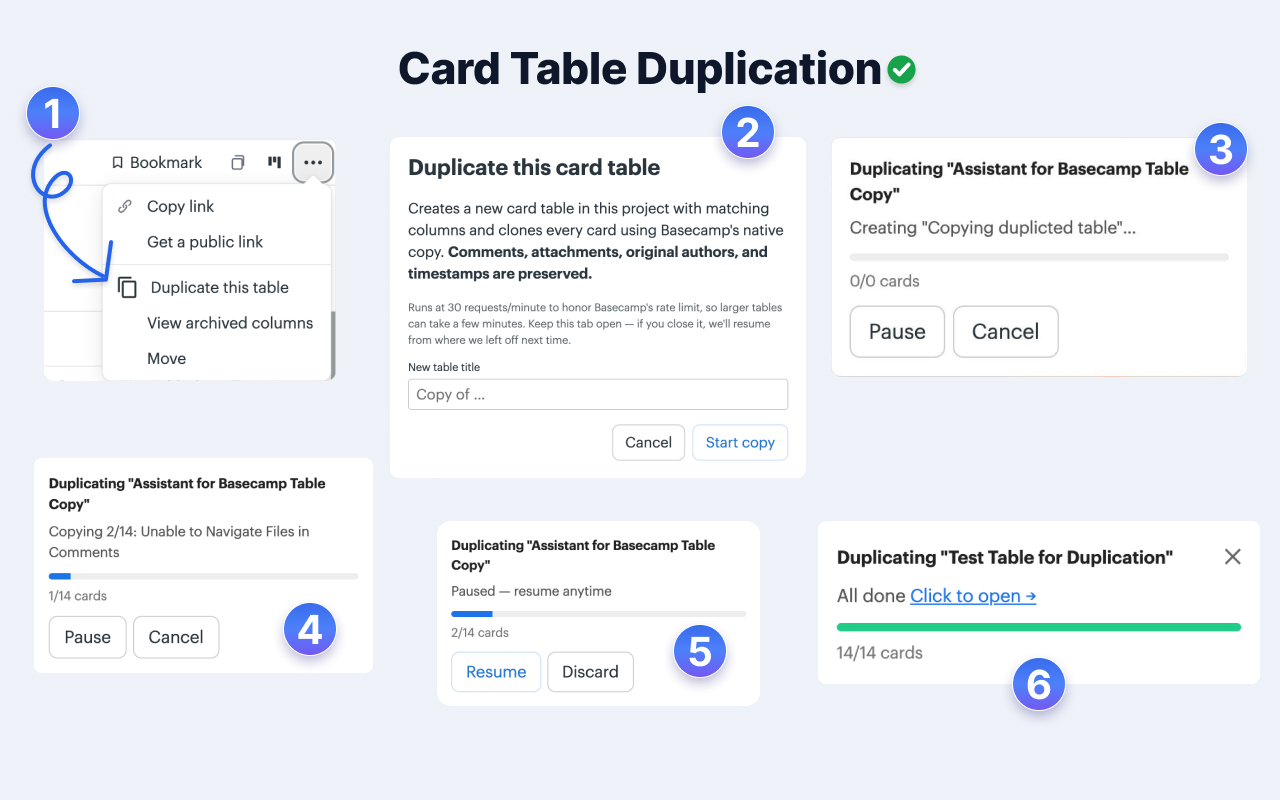
Pick "Duplicate this table", name the copy, and Assistant rebuilds the columns and clones every card using Basecamp's native copy. Comments, attachments, original authors, and timestamps all carry over.

  • Every card copied with its comments and attachments
  • Live progress with pause and resume
  • Close the tab mid-copy and it picks up where it left off
Six steps of Assistant's card table duplication: the Duplicate this table menu item, the naming dialog, and progress toasts from first card through completion

And the rest of the toolkit.

Small things that add up across a busy week.

Group & filter

Slice any board by status, assignee, tag, or priority, then search and sort.

Card table copy & move

Duplicate a whole card table in one click, or move and copy columns across tables.

Runs inside Basecamp

No new app to learn. Anyone who doesn't install it sees Basecamp unchanged.

One price, whole team

One admin pays. Everyone in the account gets it. Unlimited users, no seats.

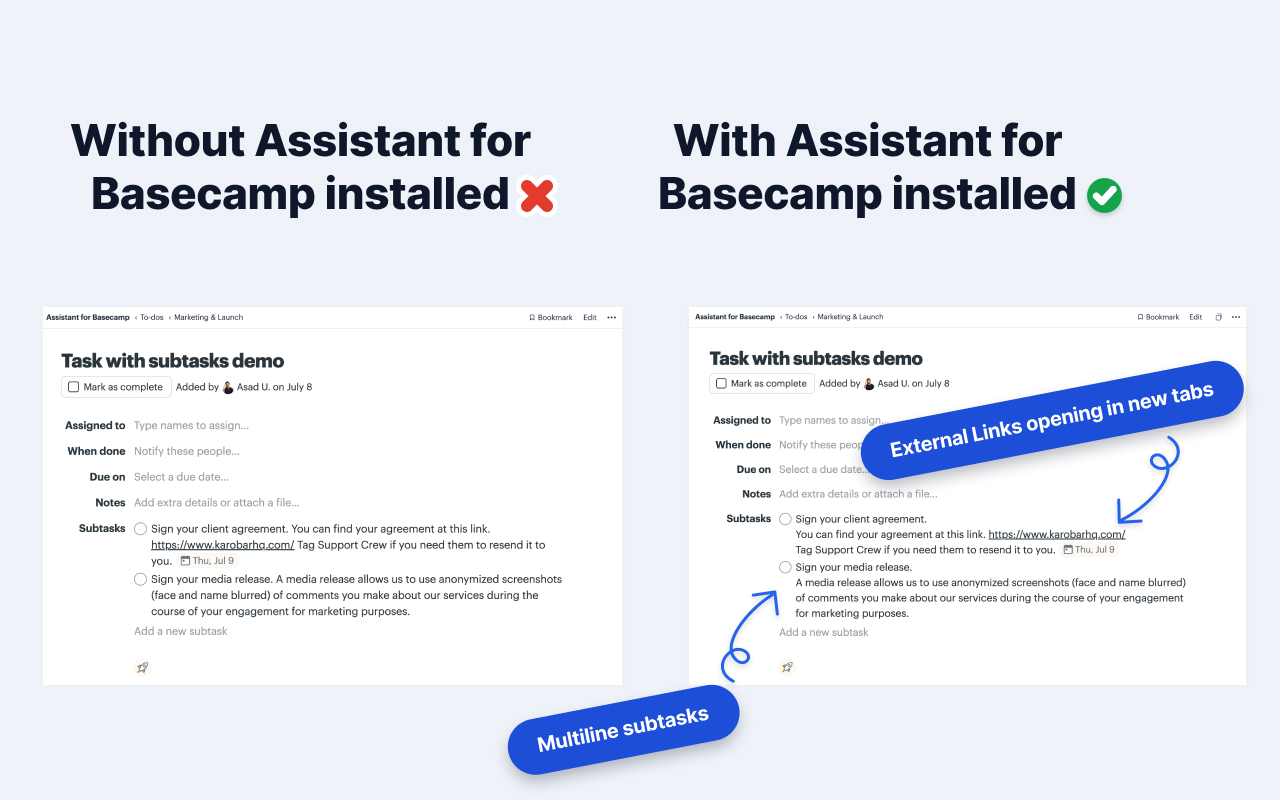
Multi-line subtasks

Subtasks written across several lines keep their line breaks, and links in them stay clickable.

Links in new tabs

Optionally open links that leave Basecamp in a new tab. Basecamp's own navigation stays untouched.

See all features →

How teams use it

Six jobs it does every week.

None of these need a new process. Each one is your existing Basecamp project, read a different way.

Agencies waiting on clients

Knowing what is blocked on someone outside the team

Set up: A status field with an "Awaiting client" option, then filter the board to it.

Saves: The Monday hunt through every project for things that stalled on a reply.

20 min × 1/week = 20 min/week

Daily standups

Saying what everyone is working on without reading lists aloud

Set up: Open the board grouped by assignee; each column is one person's work.

Saves: Ten minutes of round-robin updates that everyone forgets by lunchtime.

5 min × 5/week, for everyone (×10) = 4.2 h/week

Dev and product teams

Moving work through stages without maintaining a second tracker

Set up: Your to-do lists are already the stages (Backlog, In progress, QA, Done), so the board exists the moment you open it.

Saves: Keeping Basecamp and a separate board in sync, and the drift when someone forgets.

10 min × 2/week = 20 min/week

QA testing a release

Testing only the work that went into the build in front of you

Set up: A "Version" field on every card. QA filters the board to v2.4.1 and works that list against that build.

Saves: Reading down a long backlog to work out which fixes belong to this release and which shipped weeks ago.

25 min × 1/week = 25 min/week

Anyone running a weekly review

Finding what slipped before it becomes a problem

Set up: Stack the overdue and due-this-week filters with an assignee or tag.

Saves: Opening each list to work out what actually needs attention.

15 min × 1/week = 15 min/week

Content and marketing teams

Tracking pieces through draft, review, and published

Set up: Run the board over a Card Table, group by status, and read each brief in the split-view panel.

Saves: Losing your place on the board every time you open a brief.

10 min × 2/week = 20 min/week

Roughly 2.7 hours a day across a team of 10 on our assumptions. Modelled, not measured. Every input is listed on the pricing page, and you can change all of them.

See the numbers →

Lives inside Basecamp

An add-on, not a replacement.

Assistant isn't a new tool to migrate to or train your team on. It adds the board, fields, and statuses onto the Basecamp pages you already use every day, so everything works the way it always has, just with the pieces you were missing.

What we store, and what we don't.

Installing an extension that reads your projects is a big ask. Here's exactly how we treat it.

Runs on your pages

Assistant adds its UI to the Basecamp pages you already use. Your team doesn't migrate, and there's no second app to adopt.

We store only what you add

The tags, statuses, fields, saved views, WIP limits, and rules you create live on our servers, keyed to the Basecamp items they belong to. Your messages, to-dos, and files stay in Basecamp.

Official OAuth, revocable

You connect through Basecamp's own sign-in. Revoke access from Basecamp any time, in one click.

Asad, founder of Assistant for Basecamp
We built Assistant because we needed it. We run our own projects in Basecamp every day, and we kept hitting the same wall: no board, no priorities, no statuses. So we added them, right inside Basecamp. It's the tool we wanted for our own team, and we figured you'd want it too. If something's missing that you need, email me. I read every message.
Asad · Founder, Assistant for Basecamp

How it works

Set up in three steps.

1

Install the extension

One click from the Chrome Web Store. Works on Chrome, Edge, Brave, and every Chromium browser.

2

Connect your Basecamp

Open the extension and sign in once with Basecamp OAuth. That's when your 7-day trial starts. Secure and revocable anytime.

3

Open a project

Head into any Basecamp project and the Kanban, tags, and custom fields light up. Everyone in your account gets it. No seats to assign.

Pricing

One flat price for your whole team.

$29/month or $290/year. Unlimited seats, every feature. One admin pays, and everyone in that Basecamp account gets it.

Monthly

$29 / month

Unlimited seats · all features · cancel anytime

Save $58 / year

Yearly

$290 / year

$24.17/mo · unlimited seats · ~2 months free

Already have an account? Sign in.

FAQ

Common questions.

Does this replace Basecamp?

No. It enhances it. Assistant runs on the Basecamp pages you already use, so nobody moves to a second app. Your messages, to-dos, and files stay in Basecamp; we add a layer of tags, statuses, fields, and views on top.

Do I need to change how my team uses Basecamp?

Not at all. The extension adds UI directly onto Basecamp pages. People who don't install it still see Basecamp exactly as before.

What data do you store?

We store what Assistant adds: tags, statuses, custom field definitions and their values, saved views, WIP limits, and automation rules, keyed to the Basecamp items they belong to. Also the OAuth tokens needed to call Basecamp's API, and the transcript, summary, and action items for voice notes someone chooses to transcribe. Your messages, to-dos, and files are read live from Basecamp in your browser, not copied into our database. Voice note audio is never stored. Full detail in the privacy policy.

Does Assistant transcribe Basecamp voice notes?

Yes. Basecamp 5 records voice notes but doesn't transcribe them. Assistant adds a Transcribe button to every voice note: one click and the transcript is posted as a comment on the thread, with a one-line summary and any action items, readable by your whole team with or without Assistant.

Is there a free trial?

Yes. 7 days, no credit card, full access for your whole team. After the trial, one admin subscribes for $29/month (or $290/year) and everyone keeps access.

How does pricing work?

One flat price: $29/month or $290/year for your whole team. Unlimited seats and every feature. One admin pays, with no per-seat charges.

Who connects the Basecamp account?

A Basecamp admin connects each account once and pays. After that, everyone in that Basecamp account gets the extension automatically. No seat assignments, no access requests.

Add the fields and board Basecamp is missing.

Install the free extension. 7-day trial on all paid features. No credit card.